
Overview
Technical excellence, elegant engineering.
For the first two years, your platform was an engine. It enabled new products, supported marketing campaigns, and handled traffic spikes with grace. It was an asset.
But recently, the dynamic has shifted. The platform is no longer pulling you forward; you are dragging it behind you.
At Lemon Hive, we define a platform liability very simply: It is a liability when it gets in the way of people getting the job done.
It isn’t always a dramatic crash. More often, it is a steady build-up of friction: previews that don’t render properly, deployments that feel risky, and "computer says no" conversations until you realise your technology is capping your growth.
How do you know if you have crossed the line? We use a six-point diagnostic to separate minor annoyances from structural liabilities.
The Liability Scorecard
Rate your current platform on these six factors.
0 = Never happens | 1 = Sometimes | 2 = Frequently | 3 = Constant reality
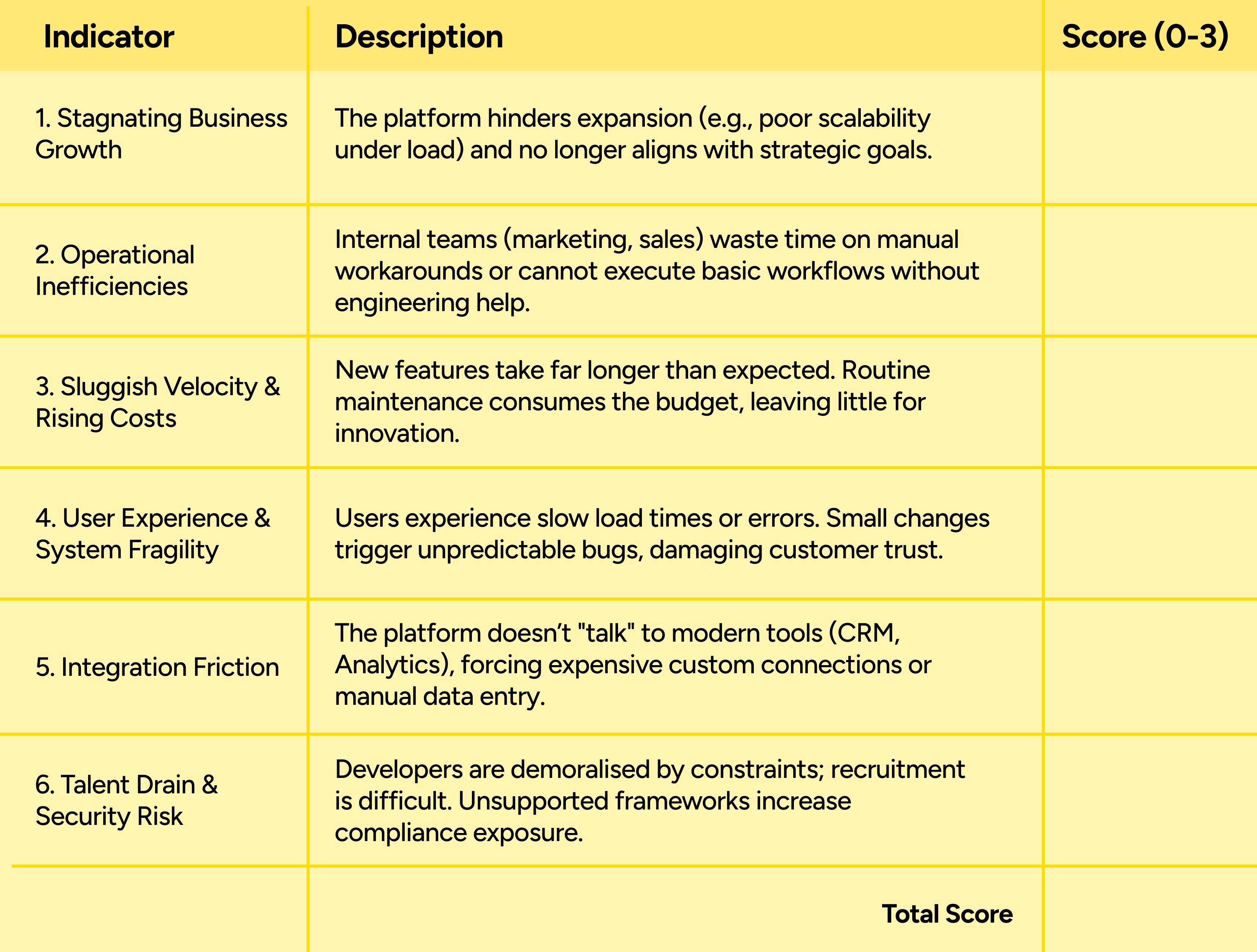
If two or more categories score 3, you are likely beyond routine maintenance.
Why this happens (and why it isn’t the team’s fault)
When a platform scores high on liability, the instinct is often to blame the original developers or the current maintenance team. Usually, neither is at fault.
Liability often results from success. Your business grew, complexity increased (multi-geography, omnichannel requirements), and the architecture was stretched beyond its original design intent.
To cope, teams resort to survival tactics:
- Microsite Sprawl: Marketing spins up unbranded pages on external tools just to move fast.
- Hardcoding: Developers bake content into code to bypass rigid CMS constraints.
- "Ignore and Override": Overwriting core vendor files to force features through, breaking the upgrade path.
These workarounds solve today’s problem but mortgage tomorrow’s stability.
The Decision: Stabilise, Refactor, or Rebuild?
If you scored 13+, you don’t necessarily need to throw everything away immediately. In fact, a full rebuild is often the wrong first step.
We recommend a staged decision framework:
1. Stabilise First (The "Stop the Bleeding" Phase)
Before committing to a rebuild, we look for high-value stabilisation.
- Scenario: Traffic is dipping, search is broken, or page loads are slow.
- Action: We isolate the critical failure points. This might mean fixing the caching layer, decoupling a specific API, or patching the security holes.
- Goal: Buy time and breathing room to plan properly.
2. Refactor (The "Evolution" Phase)
- Scenario: The core data model is good, but the frontend is dated, or the integrations are messy.
- Action: We clean and simplify the codebase, reduce accumulated technical debt, update core frameworks and dependencies, remove risky customisations, and restore a safe upgrade path to reduce security exposure and fragility.
- Clean and simplify the codebase
- Remove or isolate legacy customisations
Goal: Extend the platform’s useful life without immediate capital replacement.
3. Rebuild (The "Future-friendly" Phase)
- Scenario: The technology is end-of-life, the architecture fundamentally cannot support multi-geo/omnichannel needs, and the "tax" on every change is too high.
- Action: An architecture aligned to your current operating model and integration surface.
What to do this week
You cannot fix a liability overnight, but you can stop feeding it.
- Stop the "Shadow IT": Halt the creation of new microsites or off-platform landing pages. They are fracturing your data and brand.
- Audit the "I Cant's": Ask your Heads of Product and Marketing for a list of things they cannot do today because the platform stops them. This defines your requirements.
- Get an outside view: Internal teams often suffer from a blinkered view of their legacy platforms. They know the workarounds so well that they forget they aren’t normal.