
When you add booking to a boutique fitness website, the integration approach becomes part of your product, not just your build process. It affects the experience users get, what search engines can discover, how accessible your checkout is, and how much control your team has when requirements change.
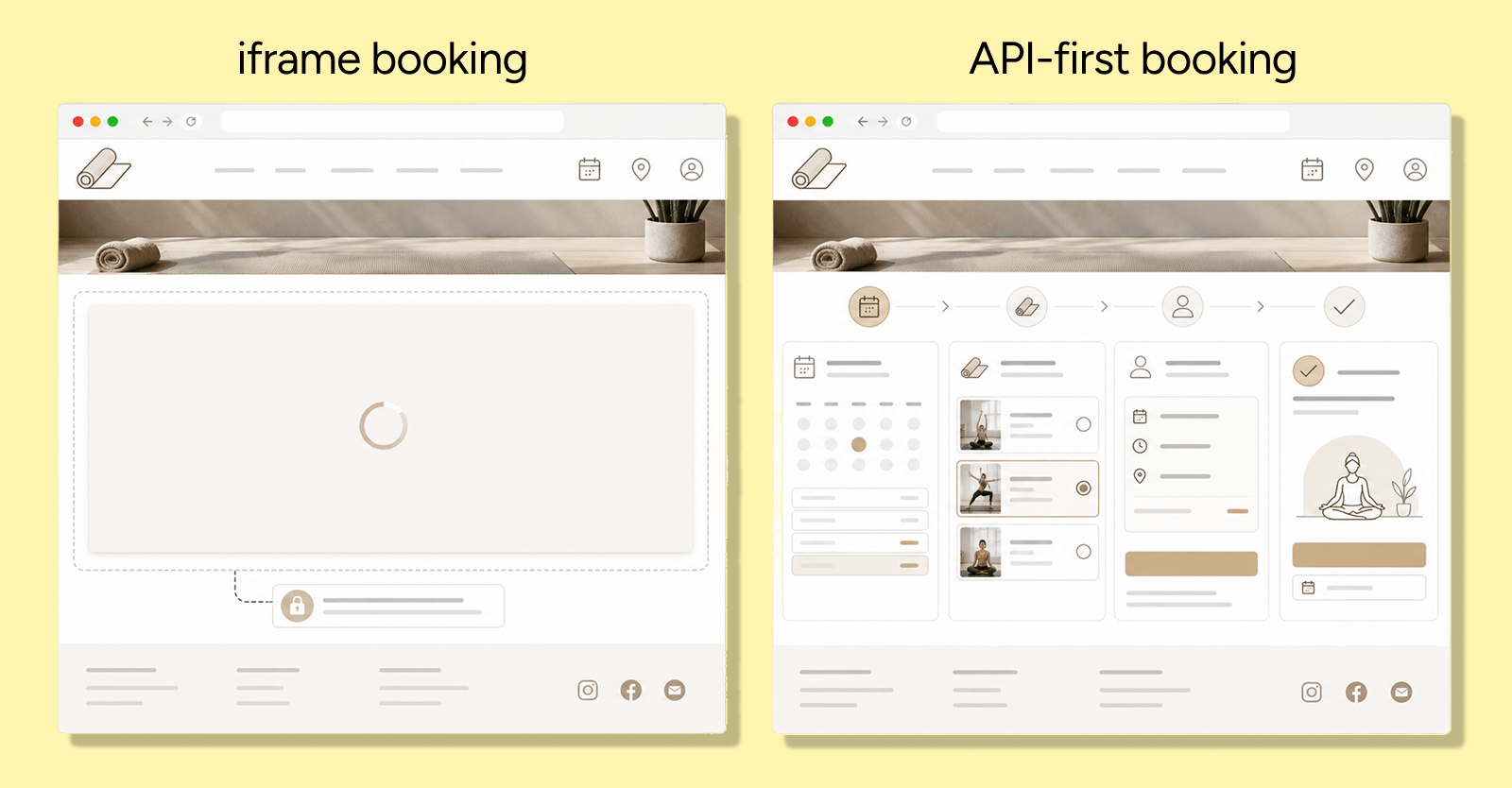
Many studios start with iframe-based booking because it’s quick. Over time, though, iframe booking often becomes a ceiling: you can style around it, but you can’t fully engineer it.
In this article:
iframe booking = embedding a third-party booking interface in an iframe.
API-driven booking = retrieving booking data and actions through APIs, then rendering the journey within your own frontend.
Below are the most common “it seemed fine at first” limitations and what typically improves when the booking flow is treated as part of your site rather than something embedded.
1. The fragmented user journey (the “walled garden” effect)
An iframe can look embedded, but the journey still lives outside your site. That often shows up as small UX breaks that add up at the moment of decision.
You’ll commonly see:
- Inconsistent scroll and focus behaviour between the host page and the embedded widget
- UI interaction differences (hover, touch gestures, component states) that don’t match the rest of your design system
- Loading timing mismatches (spinners, layout shifts, late content)
With an API-driven approach, your frontend renders the booking journey as first-party UI. That usually means:
- One design system across the full flow
- Predictable transitions between “browse” and “book”
- Fewer context switches for the user
Takeaway: if users feel like they’ve “left” your site to book, you’re spending brand trust to complete a transaction.
2. Brand dilution and design rigidity
Premium studios often invest in visual identity and tone of voice. iframe booking can undermine that by limiting control over the journey UI.
Common constraints:
- Limited theming options (colours/fonts) that don’t extend to layout or interaction design
- Inconsistent component behaviour (spacing, motion, state changes)
- A “tool inside a brand” feeling rather than a unified experience
API-driven booking typically allows you to design the booking journey as part of your product UI:
- Consistent typography and layout rules
- Shared interaction patterns
- A coherent narrative from the landing page through to checkout
3. Omnichannel experiences (without resetting the user)
Studios rarely sell through a single channel. Users may browse on mobile, decide later, and book via another touchpoint.
With iframes, user journeys can become disconnected:
- preferences not persisted consistently
- state lost between channels
- repeated form input and re-selection
API-driven systems make it more feasible to centralise experience state:
- saved preferences and favourites
- continuity across devices and sessions
- consistent booking rules and notifications
The goal is the same: reduce rework for the user and reduce rework for your team.
4. The SEO “invisible content” problem
Search visibility depends on whether content is available to crawlers in a way that can be understood and associated with your pages. With iframes, the booking content may effectively sit “next door” rather than inside your page.
Risks to consider include:
- Indexing and relevance uncertainty for timetable/class content inside an iframe
- Limited ability to ensure semantic structure (headings, internal linking, schema where applicable) across the booking content
With API-driven rendering, you can present class schedules, trainer profiles, and locations as part of your own page structure, making it easier to align content with the rest of your SEO strategy.
5. Mobile responsiveness limitations
Responsive design is rarely just “scale the widget”. It’s about interaction patterns, spacing, and content hierarchy.
iframe-based booking solutions can be constrained by:
- Fixed or predefined layouts
- Touch handling that doesn’t match your mobile UX
- Unpredictable breakpoints and awkward wrapping
An API-led approach lets your team build mobile behaviour intentionally, for example:
- Class discovery layouts that fit small screens
- Predictable controls for filtering and selecting sessions
- Check out the UI that follows your accessibility and usability standards
You’re not limited to what the embedded widget chooses to expose.
6. Analytics and attribution gaps
Measurement is where “works technically” becomes “works operationally”.
When booking is embedded, attribution can become harder because:
- Events may be captured in a different context than the rest of your site
- User identity and session continuity across domains/frames can be less straightforward
- Funnel tracking can become fragmented if the embedded flow doesn’t emit the same level of event detail you expect
With an API-driven implementation, you typically keep booking interactions inside your own frontend event model. That makes it easier to measure:
- Where users enter the booking flow
- Which class/session selections convert
- Where drop-offs happen during checkout
7. Multi-location friction and schedule hunting
If you operate across multiple locations, the booking UX becomes a decision workflow, not a single calendar.
Iframe booking often pushes users into:
- Switching between multiple widgets
- Manually comparing availability across pages or embedded modules
- Repeat actions (enter dates, search again) because each widget acts independently
With an API-driven approach, schedule data can be unified into one interface, enabling patterns such as:
- Cross-location timetable comparison
- Trainer-based filtering across studios
- Location-aware discovery within the same flow
8. Accessibility and compliance challenges
Accessibility is not just about whether content is “present”. It’s about how it’s navigable, announced, and controlled.
When the booking UI is controlled externally, you may have limited ability to address:
- Keyboard focus flows between the host page and embedded content
- Screen reader semantics inside the iframe
- Consistent ARIA practices across the full booking journey
An API-driven approach generally gives your team the leverage to build the experience accessibly from first principles:
- Semantic structure end-to-end
- Logical focus management
- Keyboard-friendly interactions
- Consistent contrast and component behaviour
Important nuance: this isn’t “iframes are always inaccessible”. It’s that your control over fixes is often reduced when the UI isn't authored in your codebase.
9. Extending beyond the website (and into the studio)
Once booking is part of your system (data + UI), it becomes easier to connect other experiences.
Iframe-first solutions are typically web-only and harder to integrate with:
- device context (camera/scanner workflows, kiosk patterns)
- location signals (where supported)
- identity flows tied to attendance or check-in
With API-driven architecture, you can build connected experiences that reuse the same booking and identity concepts so the digital experience doesn’t end at “thank you for booking”.
Conclusion: “Functional” isn’t the same as future-ready
Iframe-based booking systems can be a reasonable starting point. They’re often quick to deploy and operationally simple.
But as your studio grows, with more locations, more classes, more channels, the limitations of embedded UI tend to compound: control, measurement, accessibility, and user journey consistency all become harder to improve.
Treating booking as part of your first-party product (via API-driven architecture) isn’t just “more engineering”. It’s an operating-model shift towards:
- coherent UX
- accessible implementation you can actually fix
- instrumentation you can trust
- a platform you can extend beyond the website